Skip to content
Excel calculator + operator’s guide

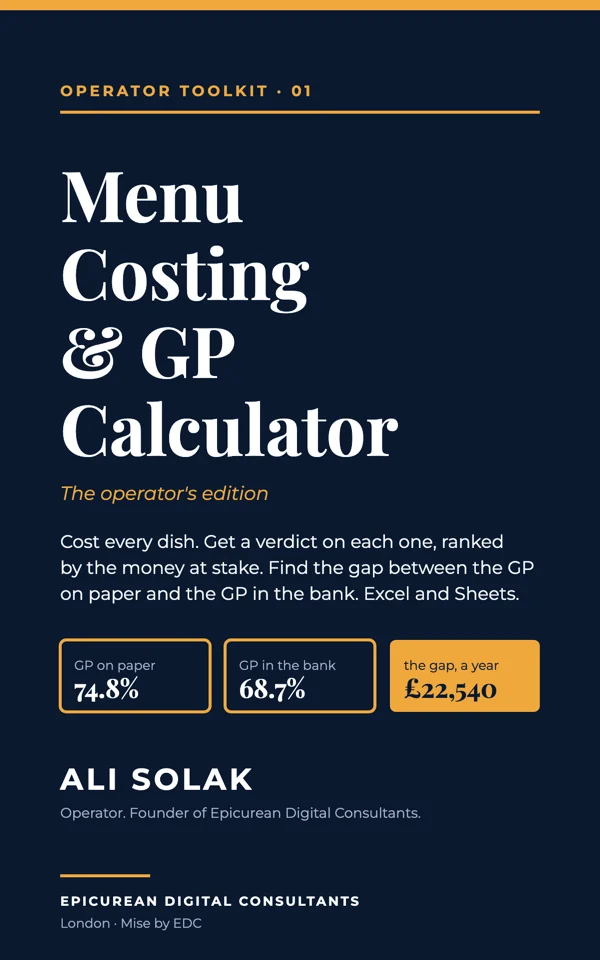
Menu Costing & GP Calculator

An operator-built calculator for UK cafés and restaurants. Cost every dish, get a verdict on each one ranked by the money at stake, find the gap between the GP on paper and the GP in the bank, and test a supplier rise or a new price before you decide.

A costing sheet tells you what a dish costs. This one tells you what to do about it.

  • 10tabs
  • 473formula checks, 0 failures
  • 4HMRC and GOV.UK sources, read 15 Oct 2026

For: The owner or head chef of one independent café, coffee shop or small restaurant in the UK who wants the number behind every dish and a Monday routine for keeping the margin.

Try the idea

The GP gap: paper to bank

The free taste of the paid GP gap tab. A menu can show 70% gross profit on paper and bank 60%. Move the sliders and watch where the points go.

Illustrative; every figure is yours to set. Respects reduced motion.Open full screen
The short version

Swipe through it.

Miseby EDC1/6

Menu Costing & GP Calculator

A costing sheet tells you what a dish costs. This one tells you what to do about it.

Every dish costed and given a verdict, ranked by the money at stake. The gap between the GP on paper and the GP in the bank. What a supplier rise does to your week, before you decide. Excel and Google Sheets.

Miseby EDC2/6

What it tells you

Four things a free template cannot

  • Which dishes to protect, re-price, promote or cut, and the pounds a week each move is worth
  • Where the gap between paper GP and bank GP is going, in the order an operator checks
  • What a supplier rise, a new price or crossing the VAT threshold does to your week
  • The five numbers to read every Monday, live
Miseby EDC3/6

Built and tested

One method. Ten tabs.

10tabs
473formula checks, 0 failures
£39every update free
Miseby EDC4/6

How it works

List. Build. Decide.

  1. 1List what you buy and build each recipe; every dish gets a plate cost and a GP%
  2. 2Add last week’s units from the till; every dish gets a verdict and the money at stake
  3. 3Read the Monday routine: five numbers, five moves, twenty minutes
Miseby EDC5/6

The operator layer

Written from the pass, not the spreadsheet

  • Verdicts, ranked
  • The GP gap
  • What-if
  • Price watch
  • Monday routine
  • VAT, in plain words
Miseby EDC6/6

Get the operator’s edition

A menu you can defend, line by line.

£39. Two Excel files and the six-page operator’s guide. Works in Google Sheets. Every corrected version free.

  • The operator’s edition£39.00
Choose yours
In detail

What it does, and what it does not.

Anyone can get a costing template. What a template cannot give you is the judgement that follows the number: which dish to touch first, where the missing margin is actually going, and what this week’s supplier email will do to the menu. That is what this edition adds, from twenty years of running sites.

Cost every dish

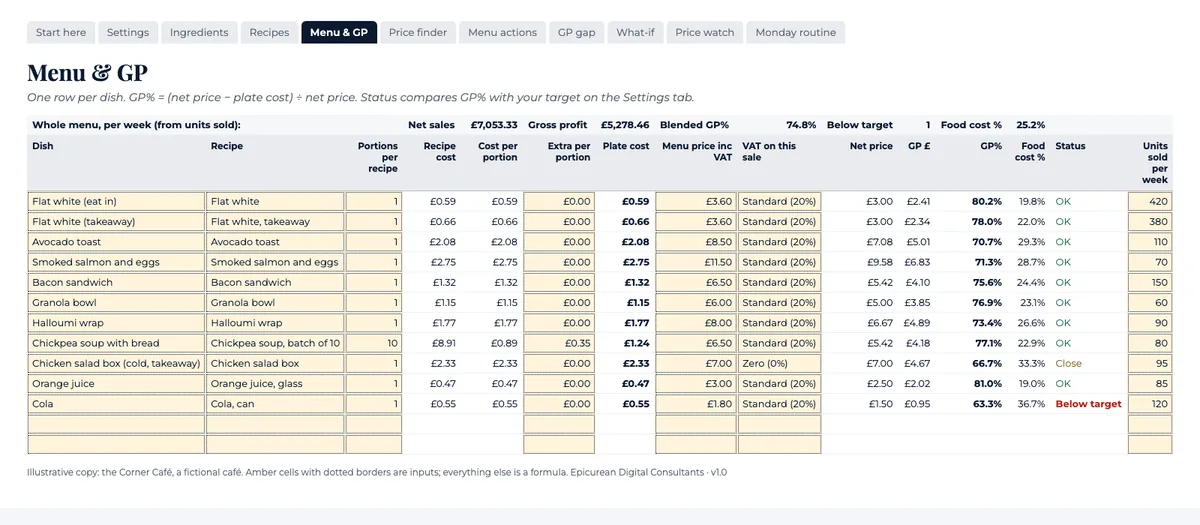
Ingredients with pack size, price, VAT rate and usable yield. Recipes built from them. Menu & GP with plate cost, net price after VAT, GP in pounds and per cent, food-cost %, a status against your target, and the blended GP% of the whole menu from your weekly sales mix. A Price finder for the price each dish needs.

A verdict for every dish

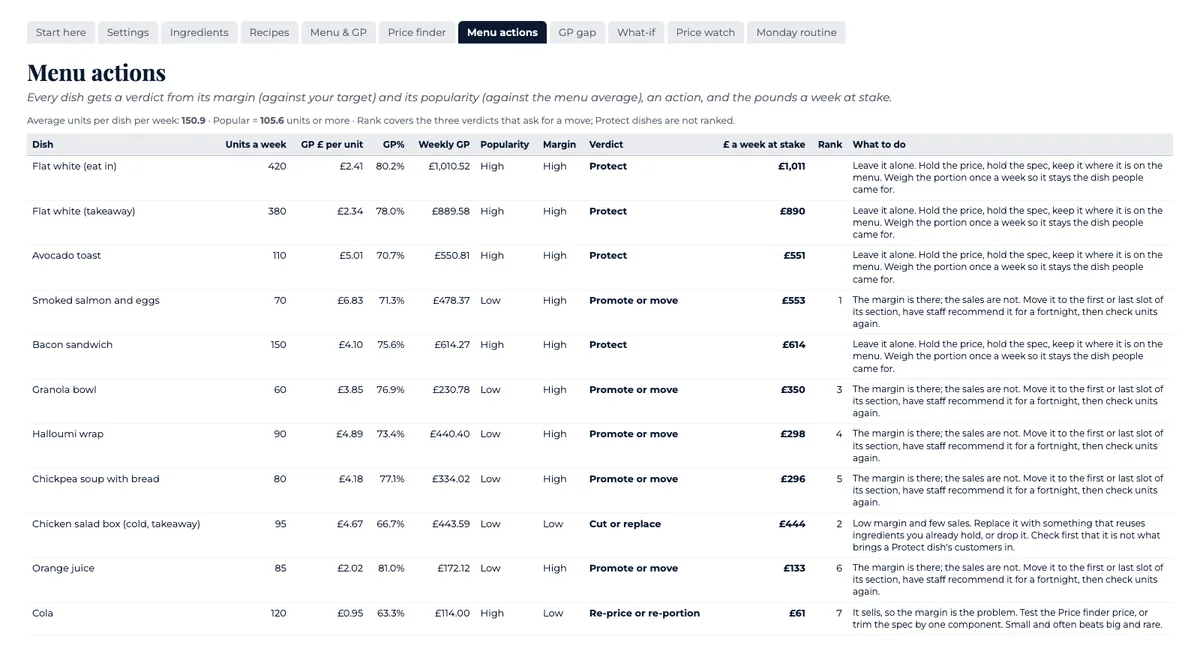
Menu actions reads each dish’s margin against your target and its sales against the menu average, gives it one of four verdicts (protect, re-price or re-portion, promote or move, cut or replace), the action to take, and the pounds a week at stake, ranked. Each verdict carries an “At the table” note from the author.

The GP gap

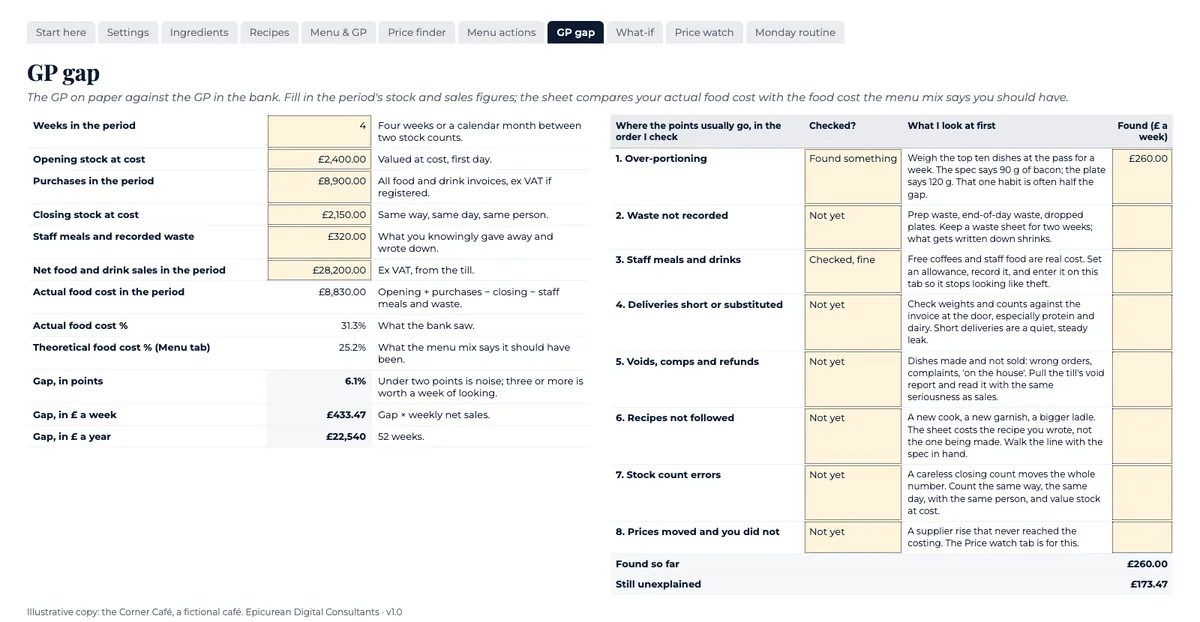
Opening stock, purchases, closing stock, staff meals and sales for the period. The tab works out your actual food cost, sets it against the food cost your menu mix says you should have, and shows the gap in points, pounds a week and pounds a year, with the eight places the points usually go, in the order an operator checks them.

What-if, before you decide

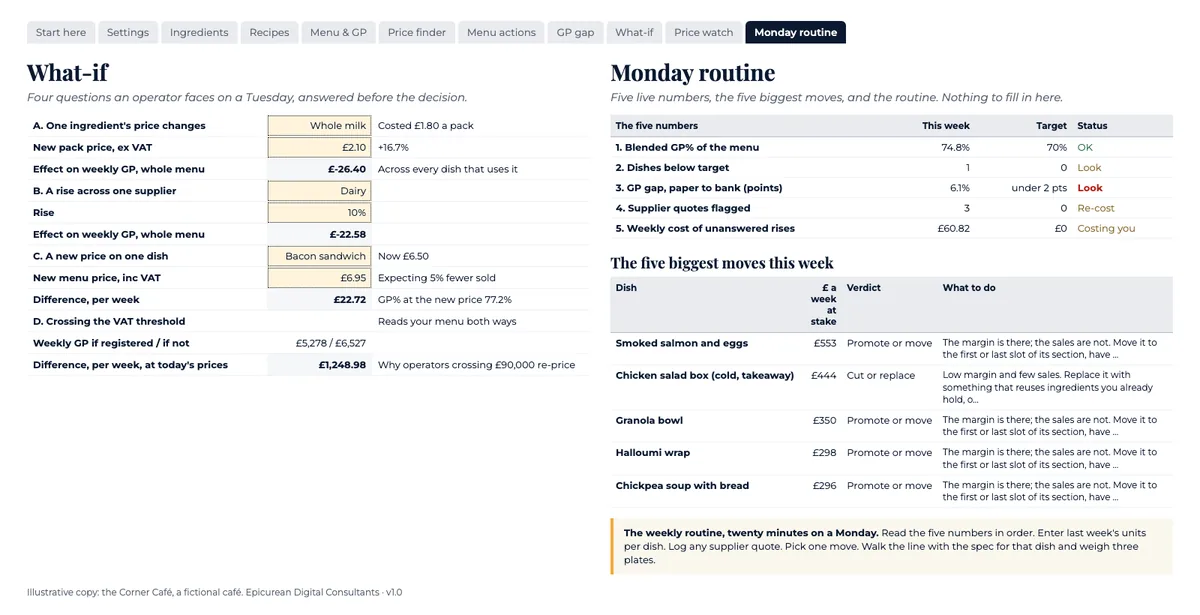
One ingredient’s price changes. A rise across one supplier. A new price on one dish, with the customers you expect to lose. Crossing the VAT threshold. Each one shows the weekly effect on the whole menu.

Price watch and the Monday routine

Log supplier quotes; anything over your trigger flags with its weekly cost. Then five live numbers, the five biggest moves this week, and the twenty-minute routine that keeps the margin.

VAT, handled

Eat-in and hot takeaway at the standard rate, cold takeaway food at zero, the not-registered case, and the rules written out from HMRC’s VAT Notice 709/1 and GOV.UK, read 15 October 2026, with links.

What it is not

It costs ingredients, not labour, rent, energy or delivery commission. GP is not profit. It is not tax, accounting or legal advice. The “At the table” notes are one operator’s experience; your trade will differ.

What you get

An illustrative copy worked through for the Corner Café, a fictional café, so every tab shows what good looks like; a blank copy for your menu; and the six-page operator’s guide. Formulas locked without a password, no macros, every function also in Google Sheets.

Who it is for

The owner or head chef of one independent café, coffee shop or small restaurant in the UK.

Who it is not for

Groups with a purchasing system that already costs recipes. Anyone wanting stock control or ordering; this is costing, pricing and menu decisions only.
Inside the file

Four of the ten tabs.

Real values from the illustrative copy. The Corner Café is fictional and its prices are not a price list.

The Menu & GP tab of the calculator: dishes with plate cost, net price, GP and status columns
Menu & GP: plate cost, net price after VAT, GP in pounds and per cent, food-cost % and a status against your target.
The Menu actions tab: a verdict, an action and the pounds a week at stake for each dish, ranked
Menu actions: one of four verdicts for every dish, the action to take, and the pounds a week at stake, ranked.
The GP gap tab: actual food cost against the menu’s, with the gap in points and pounds
The GP gap: actual food cost against the food cost your menu mix says you should have, and where the points usually go.
The What-if and Monday routine tabs: scenario inputs and five live numbers
What-if and the Monday routine: a supplier rise, a new price or the VAT threshold, then the five numbers to read each week.
Ali Solak
About the author

Ali Solak

Ali Solak has spent more than twenty years in hospitality operations and leadership, running outlets across five countries. In London he led the multi-site rollout of Simit Sarayı, with sites on Oxford Street, Bond Street, Piccadilly Circus, Leicester Square, Villiers Street, Southampton Row, King’s Road and Green Lanes.

In June 2024 he founded Epicurean Digital Consultants, a London consultancy for independent cafés, restaurants and hospitality brands. It is founder-led: you work with Ali directly, not with an account manager. He is the author of Before You Sign the Lease.

Get it

Get it.

The operator’s edition

£39.00

Two Excel files (illustrative and blank) and the six-page operator’s guide.

  • Ten tabs: Ingredients, Recipes, Menu & GP, Price finder, Menu actions, GP gap, What-if, Price watch, Monday routine, Settings
  • A verdict and an action for every dish, with the pounds a week at stake, ranked
  • The GP gap: your actual food cost against the menu’s, and where the points usually go
  • VAT handled: eat-in, hot and cold takeaway, and what crossing the threshold does to your week
  • Illustrative copy worked through for a fictional café, plus a blank copy
  • Every corrected version free

Buy now

Edition
Have a partner code?

Payments by Stripe: card, Apple Pay, Google Pay. Prices in GBP, no VAT added (not VAT-registered).

Before you buy

  • Not advice. This tool shows a method. It is not tax, accounting or legal advice. The VAT treatment of food is detailed and depends on what you sell and how you sell it. Check your own position against HMRC’s guidance or with your accountant. The “At the table” notes are one operator’s experience; your trade, your site and your customers will differ.
  • Figures dated. Version 1.0, 15 October 2026. The VAT rates and rules were read at source on 15 October 2026; the Settings tab says where and when to re-check. The sample café is fictional and its prices are not a price list.
  • How it was made. Built by code from the author’s method. The text, including the “At the table” notes, was drafted by an AI system (Claude, Anthropic) from the author’s experience and approach, then edited, checked and approved by the author, who is responsible for every figure and every judgement in it. No AI imagery; the cover is typographic.
  • Corrections. Confirmed errors are fixed within fourteen days and buyers are emailed the corrected file.
  • Refund. Full refund on request for 14 days.

Questions

Does it work in Google Sheets?
Yes. Upload the Excel file to Google Drive and open it with Sheets. Every function in it exists in Sheets; there are no macros.
What makes this different from a free costing template?
The costing part is the same arithmetic anyone can do. The rest is not in a template: a verdict and an action for every dish ranked by the money at stake, the GP gap between paper and bank with the causes in the order to check them, the what-if answers for a supplier rise or a new price, and the Monday routine. Those come from running sites, not from a spreadsheet.
Can I change the formulas?
Yes. Sheets are protected without a password so you do not overwrite a formula by accident. Review > Unprotect Sheet removes that.
How many dishes?
Up to 60 dishes, 300 recipe lines and 150 ingredients. Need more? Email and we will send a larger copy.
Does it handle VAT?
Yes: eat-in and hot takeaway at the standard rate, cold takeaway food at zero, a setting for businesses that are not VAT-registered, and a what-if for crossing the threshold. The rules are written out in the file with their sources.
Is this tax advice?
No. It shows a method. Check your own VAT position against HMRC’s guidance or with your accountant.
What if a rate changes?
Rates sit in labelled cells on the Settings tab with the date they were checked. Change the cell and the whole file follows. Buyers get every corrected version free.
Know someone who needs this?

Share it and earn 50%.

Join Mise Partners
Menu Costing Calculator£39.00 Get it